Plain Clip
Clipboard tool for Windows
Paste what you copied, without formatting, right away.
Paste text copied from Outlook emails or web pages without fonts or colors. Just press Left Shift twice, without opening any window. Text you copied a little while ago can be reused from a short list.
- Available
- Windows 11 (64-bit)
- Free
- English and Japanese
- Version 2.1.2
That is almost all there is to it
-
Press Left Shift twice to paste as plain text
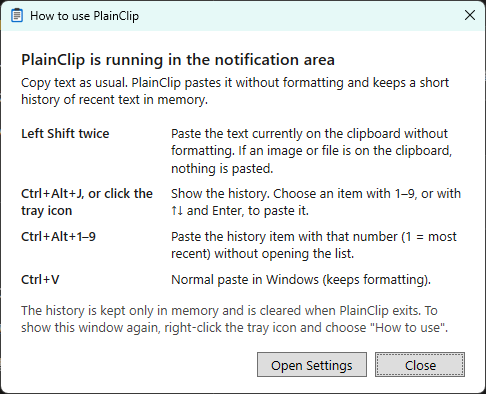
Pastes the text you just copied without formatting. You can choose the key to press twice: Left or Right Shift, or Left or Right Ctrl.
-

You always know what will be pasted
If an image or a file is on the clipboard, nothing is pasted and a short notice appears. Older text is never pasted by surprise.
Useful when
Copying from email or the web
Paste into documents or chats without bringing along font sizes and colors.
Reusing commands
Use a command you copied a moment ago again in PowerShell or SSH.
Switching between a few texts
Pick an address, a number or a standard sentence from a few items by number.
Main features
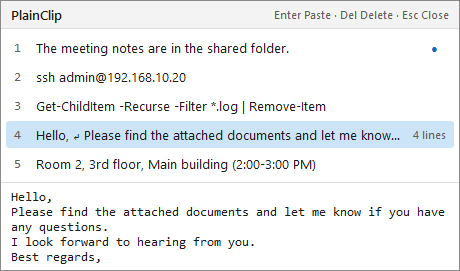
- History list: open it from the tray icon (or a shortcut) and paste instantly with 1-9. Multi-line items can be checked below the list
- Number shortcuts (optional): paste a history item by number with keys such as Ctrl+Alt+1-9, without opening the list
- The history is kept only in memory and cleared when the app exits. Respects the "do not keep in history" flag of password managers
- No network access, no administrator rights. English and Japanese interface
Requirements and availability
| OS | Windows 11 (64-bit) |
|---|---|
| Get it from | Microsoft Store |
| Languages | English and Japanese |
Recent updates
- The web page and privacy policy opened from the settings window now use the site's new address (
www.ja1bus.com). Features and behavior are unchanged.
Documents
Source code and license
The source code of this application is available on GitHub under the MIT License.